Friday, July 24, 2020

Wordpress warning: Use of undefined constant WP_CONTENT_DIR

After upgrading PHP from version 5 to 7 on my shared hosting server, I've got the following error on my wordpress sites:

Warning: Use of undefined constant WP_CONTENT_DIR - assumed 'WP_CONTENT_DIR' (this will throw an Error in a future version of PHP).
Your PHP installation appears to be missing the MySQL extension which is required by WordPress.

Deprecated: Directive 'allow_url_include' is deprecated in Unknown on line 0


As an workaround, I added the following on the wp-config.php before the call to wp-settings.php:
define( 'WP_CONTENT_DIR', ABSPATH . 'wp-content' );


Wordpress error - MySQL extension error after PHP upgrade

When I tried to update PHP version on my shared hosting server from PHP5 to PHP7, my wordpress sites started to give the following error:

Your PHP installation appears to be missing the MySQL extension which is required by WordPress.


To solve it, I had to update the .htaccess file in public_html folder with the following line:

AddHandler application/x-httpd-ea-php73 .php .php7 .phtml

Saturday, July 20, 2019

ODBC error IM003 in SQLConnect on Siebel Server start

When trying to start Siebel Server on AIX 7.1:
bash-4.3$ start_server all

The following error was found in the log files:
ODBC error IM003 in SQLConnect:
[DataDirect][ODBC lib] Specified driver could not be loaded
(native error 0).
Unable to login using specified ODBC parameters.

The cause of the error was an incorrect LIBATH configuration, where lib32 from Oracle Client was missing.

So I updated siebenv.sh file:
LIBPATH=$LIBPATH:$ORACLE_HOME/lib32:$ORACLE_HOME/lib

The user ID or password that you entered is incorrect - Siebel IP2017 SMC Login Failure

I was not able to login to SMC after a fresh install, the error message displayed was:

---------------------------
Message from webpage
---------------------------
The user ID or password that you entered is incorrect.
---------------------------
OK   
---------------------------


Of course the credentials I was using was the same as the ones provided during installation, but it was not working, regardless of what I tried.

I also tested changing the certificates as it is responsible for 99% of the errors during SMC utilization, but it wasn't the case this time.

So finally what I did to solve the issue was changing the JRE that comes with installation,. I don't know what exactly was wrong, but replacing it by Java8 (64-bit) found on /usr folder (exported as $JAVA_HOME) was enough to get it working properly.

Below the commands I used for it:
cd $ai_location
mv jre jre_orig
ln -s $JAVA_HOME/jre jre


Could not load program sqlplus error on AIX

First time when I finished installing Oracle Client 12.2.0.1 in AIX 7.1 and trying to run a simple ./sqlplus command, the following error was shown:

bash-4.3$ ./sqlplus
Could not load program ./sqlplus:
rtld: 0712-001 Symbol GetQueuedCompletionStatus was referenced
      from module /u01/app/oracle/client/lib/libons.so(), but a runtime definition
            of the symbol was not found.
rtld: 0712-001 Symbol ReadFile was referenced
      from module /u01/app/oracle/client/lib/libons.so(), but a runtime definition
            of the symbol was not found.
rtld: 0712-001 Symbol WriteFile was referenced
      from module /u01/app/oracle/client/lib/libons.so(), but a runtime definition
            of the symbol was not found.
bash-4.3$


It was odd, since the same installation worked with no errors in another machine, so after some research I figured out that IOCP module was not enabled on the server. It can be check by the following command:

bash-4.3$ lsdev | grep iocp

  iocp0       Defined  I/O Completion Ports


As you can see by the output above, iocp is set to Defined, which is the default configuration. In order to have the Oracle Client working properly, one must work with the system admin to have it enabled. The expected output for this command is:

bash-4.3$ lsdev | grep iocp

  iocp0    Available   I/O Completion Ports


Tuesday, April 30, 2019

Error when importing virtual machine in VirtualBox

After having a problem with my external drive, I had to re-import the old images in a new VirtualBox installation and started facing the following error:

Document is empty.
Location: 'D:\VirtualBox VMs\Ubuntu 18.04\Ubuntu 18.04.vbox', line 1 (0), column 1.


Ok, so after navigating to that directory and opening the referred vbox file (Ubuntu 18.04.vbox), I realized it was empty.

Fear not! In the same folder should exist another file with .vbox-prev extension. All you need to do is to delete this 0-byte file, rename the .vbox-prev to .vbox and re-import it.

Best of luck!

Saturday, April 27, 2019

Siebel Install Database Error: set_unicode.sql not found

When doing a fresh install of Siebel version IP19.2 on an Oracle Linux 7.6 server, I faced the following error during the database installation:

UpgradeLog UpgradeInfo 3 0000000254e42d16:0 2019-04-18 19:28:43 Status Message (Executing SQL statements in file /opt/siebel/ses/dbsrvr/oracle/set_unicode.sql ...)
Trace Trace 3 0000000254e42d16:0 2019-04-18 19:28:43 Unable to open file 'set_unicode.sql'.

After a long night of research I figured out that this error was caused by a error that happened during the Siebel binaries installation, as seen in the $SIEBEL_ROOT/cfgtoollogs/oui path:

$ ls -ltr *.err

I found non-zero .err files, so taking a closer look to these files, this is what I found:

java.io.IOException: Cannot run program "/bin/csh": error=2, No such file or directory at java.lang.ProcessBuilder.start(ProcessBuilder.java:1048)


With the above error message I was able to identify that the root cause of the error was the lack of c shell installation on my server, so I simply ran:

yum install tcsh

It is important to note that, after installing the c shell lib, I re-installed Siebel from scratch and everything ran smoothly =)

Friday, April 26, 2019

ODBC error 81 in SQLConnect

After installing Oracle Client 12.2.0.1 (32-bit) and Siebel IP17, one of the mandatory steps is to test connectivity to the Database using odbcsql command, like:

odbcsql /u <db_username> /p <db_password> /s <DSN_Name>

But I wasn't able to get it to work, instead I was facing the below error:

Logging into "SiebelInstall_DSN" as "SIEBEL" ...
ODBC error 81 in SQLConnect:
523 80
(native error 0).
Unable to login using specified ODBC parameters.

After some troubleshooting I was able to solve it after creating a symbolic reference for libclnst lib:

cd $ORACLE_HOME/lib
ln -s libclntsh.so.12.1 libclntsh.so


Monday, October 29, 2018

Basic git commands

So you are starting to research about code versioning and heard about git and github?

Below are some very few basic commands that I use to clone a github repository, create a new branch to develop a new feature or fix a bug, add and commit modifications to the branch and push it to github's repository.


# To clone a repository is the same as to download the files from a github repository to your local machine:
git clone <github-repository-address>


# Then you will create a new branch
git checkout -b <new-branch>


# after your development is ready, you add it to git and commit
git add .
git commit -m "<commit message>"


# after the commit is done, change to master and merge it
git checkout master
git merge <new-branch>


# after the merge is done, push it to the remote repository
git push origin master

WARNING: lib not found when converting python script using pyInstaller

When trying to convert a Python script to .exe using pyInstaller, warning message is shown:
WARNING: lib not found: api-ms-win-crt-math-l1-1-0.dll dependency of C:\Program Files (x86)\Python\python.exe


The command line used is:
pyinstaller --onefile --noconsole main.py


Looking for the file, I could find it in the following path:
C:\Program Files (x86)\Java\jre1.8.0_181\bin


pyinstaller version in use is 3.3.1 and the latest one available at the moment is 3.4, so I proceeded on upgrading it.


Firstly uninstalling the current pyinstaller version:
pip uninstall pyinstaller


Then installing the newest and desired version:
pip install pyinstaller


After updating pyInstaller version, build was successfull:
set JAVA_HOME=C:\Program Files (x86)\Java\jre1.8.0_181
set PATH=%JAVA_HOME%\bin:%PATH%
pyinstaller --onefile --noconsole main.py

Wednesday, February 7, 2018

Unable to connect to the database error when running IRM on IP17

Sometimes when running the IRM as part of the upgrade for Siebel IP17 version, you may face "Unable to connect to the database" error.

To address it, include the following section on tools.cfg file:
[InfraDatabase]
SQLTraceThreshold = -1

Wednesday, January 3, 2018

DJANGO - Not able to run collectstatic on a shared hosting server using cPanel

As part of setting-up a new Django application, one will need to run collectstatic in order to copy all static files.

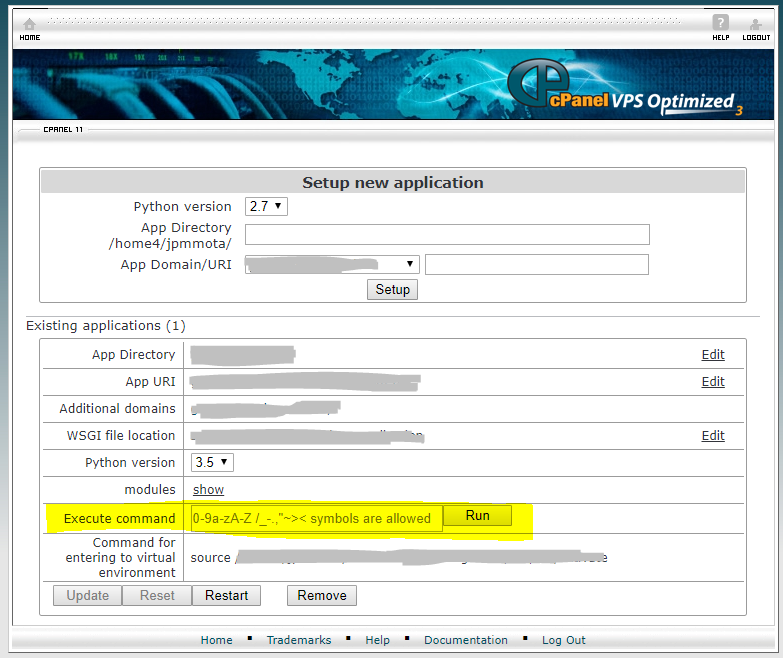
It happens that, as I have a shared account on a hosting comp, I have no access to the prompt, the only option to execute this kind of commands was through Execute Command on cPanel:


And, when trying to run collectstatic, this is the output I was facing:

python manage.py collectstatic

You have requested to collect static files at the destination location as specified in your settings.
This will overwrite existing files!
Are you sure you want to do this?
Type 'yes' to continue, or 'no' to cancel: Traceback (most recent call last):
File "manage.py", line 15, in <module>execute_from_command_line(sys.argv)
File "/home/user/virtualenv/mysite/3.5/lib/python3.5/site-packages/django/core/management/__init__.py", line 371, in execute_from_command_line
utility.execute()
File "/home/user/virtualenv/mysite/3.5/lib/python3.5/site-packages/django/core/management/__init__.py", line 365, in execute
self.fetch_command(subcommand).run_from_argv(self.argv)
File "/home/user/virtualenv/mysite/3.5/lib/python3.5/site-packages/django/core/management/base.py", line 288, in run_from_argv
self.execute(*args, **cmd_options)
File "/home/user/virtualenv/mysite/3.5/lib/python3.5/site-packages/django/core/management/base.py", line 335, in execute
output = self.handle(*args, **options)
File "/home/user/virtualenv/mysite/3.5/lib/python3.5/site-packages/django/contrib/staticfiles/management/commands/collectstatic.py", line 186, in handle
if input(''.join(message)) != 'yes':
EOFError: EOF when reading a line


What I figured out is that collectstatic command was waiting for an input and I wasn't able to provide any as Execute Command from cPanel doesn't allow me to interact after you submit any command.

To overcome such limitation, I had to append the --noinput argument, so the command was successfully executed.

Another alternative, if your hosting company provides a remote MySQL access, you may be able to open a cmd prompt from your computer, connecting to the server database, so you'll be able to interact with the script as much as you need. This is what I started doing after discovered this alternative, it's easier and there are some commands that don't allow us to have a --noinput argument.

Hope this helps everyone who may face a similar problem.

Monday, December 5, 2016

How to install JDeveloper 12.2.1.0

Where to download:
http://www.oracle.com/technetwork/developer-tools/jdev/downloads/jdev12210download-3046390.html


Do not forget to download both file1 and file2.
You don't need to extract file2, you can keep it as .zip:


Installation steps:
Double click on jdev_suite_122100_win64.exe file and then follow the installation steps:


Thursday, October 13, 2016

How to solve Siebel SBL-DAT-00142 error (Could Not Open Repository File)

Error message:
SBL-DAT-00142: Could Not Open Repository File

Solution:
Set the following environment variables on the end of siebenv.sh script:
MWSTG_WAITOPEN=1; export MWSTG_WAITOPEN
MWSTG_WAITOPEN_TIMEOUT=100;export MWSTG_WAITOPEN_TIMEOUT

Monday, August 8, 2016

Error when trying to apply a new swse logical profile

When trying to apply a new SWSE Logical Profile on Siebel Innovation Pack 2015, Was getting the following error:

INFO: 
SECTION 
STEP DeployedLanguage
ATTRIBUTE Multiselect
Aug 8, 2016 2:47:03 PM oracle.siebel.configurator.utility.DefaultExceptionHandler uncaughtException
SEVERE: java.lang.StringIndexOutOfBoundsException: String index out of range: -1
java.lang.StringIndexOutOfBoundsException: String index out of range: -1
at java.lang.String.substring(String.java:1937)
at oracle.siebel.configurator.utility.ConfigUtility.DLOVInstalledLanguage(ConfigUtility.java:602)
at oracle.siebel.configurator.engine.AccessSCM.executeDLOVAttrib(AccessSCM.java:4961)
at oracle.siebel.configurator.engine.AccessSCM.getNextStep(AccessSCM.java:745)
at oracle.siebel.configurator.screen.ConfiguratorFrame$nextActionListener.actionPerformed(ConfiguratorFrame.java:2397)
at javax.swing.AbstractButton.fireActionPerformed(AbstractButton.java:1995)
at javax.swing.AbstractButton$Handler.actionPerformed(AbstractButton.java:2318)
at javax.swing.DefaultButtonModel.fireActionPerformed(DefaultButtonModel.java:387)
at javax.swing.DefaultButtonModel.setPressed(DefaultButtonModel.java:242)
at javax.swing.plaf.basic.BasicButtonListener.mouseReleased(BasicButtonListener.java:236)
at java.awt.Component.processMouseEvent(Component.java:6267)
at javax.swing.JComponent.processMouseEvent(JComponent.java:3267)
at java.awt.Component.processEvent(Component.java:6032)
at java.awt.Container.processEvent(Container.java:2041)
at java.awt.Component.dispatchEventImpl(Component.java:4630)
at java.awt.Container.dispatchEventImpl(Container.java:2099)
at java.awt.Component.dispatchEvent(Component.java:4460)
at java.awt.LightweightDispatcher.retargetMouseEvent(Container.java:4577)
at java.awt.LightweightDispatcher.processMouseEvent(Container.java:4238)
at java.awt.LightweightDispatcher.dispatchEvent(Container.java:4168)
at java.awt.Container.dispatchEventImpl(Container.java:2085)
at java.awt.Window.dispatchEventImpl(Window.java:2478)
at java.awt.Component.dispatchEvent(Component.java:4460)
at java.awt.EventQueue.dispatchEvent(EventQueue.java:599)
at java.awt.EventDispatchThread.pumpOneEventForFilters(EventDispatchThread.java:269)
at java.awt.EventDispatchThread.pumpEventsForFilter(EventDispatchThread.java:184)
at java.awt.EventDispatchThread.pumpEventsForHierarchy(EventDispatchThread.java:174)
at java.awt.EventDispatchThread.pumpEvents(EventDispatchThread.java:169)
at java.awt.EventDispatchThread.pumpEvents(EventDispatchThread.java:161)
at java.awt.EventDispatchThread.run(EventDispatchThread.java:122)


Managed to solve that re-creating the install image and installing the SWSE again. Probably an installation issue.

Thursday, July 21, 2016

Siebel Tools crashing when running IRM

When trying to open Siebel Tools IP14 to start IRM process, the application is crashing with the following message:


Problem signature:
  Problem Event Name: APPCRASH
  Application Name: siebdev.exe
  Application Version: 8.1.1.14
  Application Timestamp: 56722644
  Fault Module Name: sslcshar.dll
  Fault Module Version: 1.0.0.0
  Fault Module Timestamp: 5671db67
  Exception Code: c0000005
  Exception Offset: 0005ab33
  OS Version: 6.1.7601.2.1.0.272.7
  Locale ID: 1033
  Additional Information 1: 0a9e
  Additional Information 2: 0a9e372d3b4ad19135b953a78882e789
  Additional Information 3: 0a9e
  Additional Information 4: 0a9e372d3b4ad19135b953a78882e789


To solve the crash, had to activate Compatibility Mode to Windows 2003 and set it to run as Administrator. Hope it helps you as well.

Tuesday, July 5, 2016

Troubleshooting java.lang.NoClassDefFoundError error on Siebel Configuration Wizard

While trying to run Siebel Configuration Wizard (version 8.1.1.5), I've faced following error:

/siebel/siebsrvr/bin-> ./ssincfgw -args LANG=ENU MODEL_FILE=/siebel/dbsrvr/admin/dbsrvr.scm -is:javaconsole -console
InstallShield Wizard

Initializing InstallShield Wizard...

Preparing Java(tm) Virtual Machine...
...................................
...................................
...................................
...................................
...................................
...................................
...................................
...................................
...................................
...................................
...................................
...................................
...................................
...................................
...................................
...................................
...................................
...................................
...................................
...............
Running InstallShield Wizard...
Exception in thread "main" java.lang.NoClassDefFoundError: run


After some research, figured out that setup.jar file was corrupt.

It can be checked by running "jar -tf" command:

/siebel/siebsrvr/bin-> jar -tf setup.jar
java.util.zip.ZipException: error in opening zip file
        at java.util.zip.ZipFile.open(Native Method)
        at java.util.zip.ZipFile.<init>(ZipFile.java:129)
        at java.util.zip.ZipFile.<init>(ZipFile.java:90)
        at sun.tools.jar.Main.list(Main.java:1031)
        at sun.tools.jar.Main.run(Main.java:223)
        at sun.tools.jar.Main.main(Main.java:1201)


The correct output should be:

/siebel/siebsrvr/bin-> jar -tf setup.jar
META-INF/MANIFEST.MF
Messages.class
Messages_en.class
Messages_da.class
Messages_de.class
Messages_es.class
Messages_fr.class
Messages_fi.class
Messages_it.class
Messages_nl.class
Messages_pt_BR.class
Messages_pt.class
Messages_sv.class
Messages_cs.class
Messages_ko.class
Messages_zh.class
Messages_ja.class
Messages_ru.class
Messages_pl.class
Messages_zh_TW.class
35c4998a41833c76299d6969568803c3/wizard.xml
com/installshield/wizard/Wizard.qjml
com/installshield/wizard/commandline/SilentMode.class
.....


To solve the problem, I've just copied setup.jar from a working environment and re-ran config command.

Wednesday, May 4, 2016

How to install Siebel Web Client IP16

Where to download:
https://edelivery.oracle.com


Installation steps:


How to troubleshoot CreateOUIProcess(): 5 error on Oracle Universal Installer

Hi everyone.

Recently, during a Siebel Web Client install, I faced an odd error when launching Oracle Universal Installer.

The error was: CreateOUIProcess(): 5


After some research, I figured out that this is caused because of my temp folder.

By default, my TEMP environment variable is configured to %USERPROFILE%\AppData\Local\Temp, which was causing the error in the installation.


In my case, I changed this variable to D:\temp and, after that, I was able to lanch the installer as expected.